


Our Network
Interface Card line features 3Com and KTI
products, both leaders in the industry with a
commitment to quality.
The following
network interface cards are currently available:
KTI:
NE2000J ISA
Jumpered NE2000 compatable jumpered network card
NE2000P
PCI Plug and Play ethernet adapter
NE100
PCI Plug and Play fast ethernet adapter
3Com
NE1003c 3Com PCI Plug
and Play fast ethernet adapter
Drivers
for these and past network cards:
| NE2000P.ZIP |
17K |
KTI standard PCI
ethernet card drivers |
| NE100.ZIP |
28K |
KTI 10/100 PCI
ethernet card drivers |
| BOCANIC.ZIP |
499K |
Boca PCI network card
setup |
| MAXNIC.ZIP |
828K |
Maxtech PCI network
card setup |
| |
|
3com Fast Ethernet
adaptercard drivers |
| NETWORK |
FTP |
Network FTP section |
To learn more
about fast ethernet, take a look at 3Com's fast ethernet center.
Tech Notes:
For a tutorial on setting up a peer to peer
network in Windows 95, click here
For jumper settings for the KTI NE2000J jumpered
ISA NIC, click here
Many people have asked us if it is possible to
connect two computers via twisted pair connection
without using a hub. The answer (in theory) is:
yes, just reverse the TX and RX pairs, and your
computers will be talking. Please note that in
practice we have found this to be less than
reliable, and may cause network errors with some
protocols.
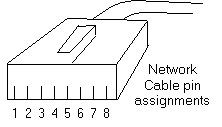
Here are
the wire assignments for the cable:
Troubleshooting:
If your network card is
not communicating in Windows 95 or NT, make sure
you double check your IRQ. Windows will NOT
report an IRQ conflict involving your network
card, even if it is causing your net connection
to fail. Even a plug and Play card must have a
seperate and unique IRQ
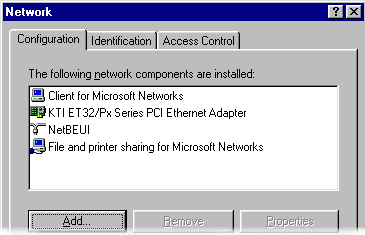
When
troubleshooting a small Windows 95 network, it
often helps in eliminating setup problems if you
simplify. Go into control panel's network
options, and make sure that only the following
options are set up like this: (get rid of
anything else)
Don't forget to check
under identification to ensure that all workgroup
names are the same and that all computer names
are different. It is also a good idea to share at
least one drive on each computer for the
troubleshooting process. This makes it easier to
verrify a connection.
.
|
